Trace each target column back to its sources in SQL Server T-SQL and
Oracle SQL and PL/SQL. Embed GSP’s column-level lineage analysis in your
.NET application and export relationships as XML or JSON — without a database connection.
SQL Server column lineage through joins and functions
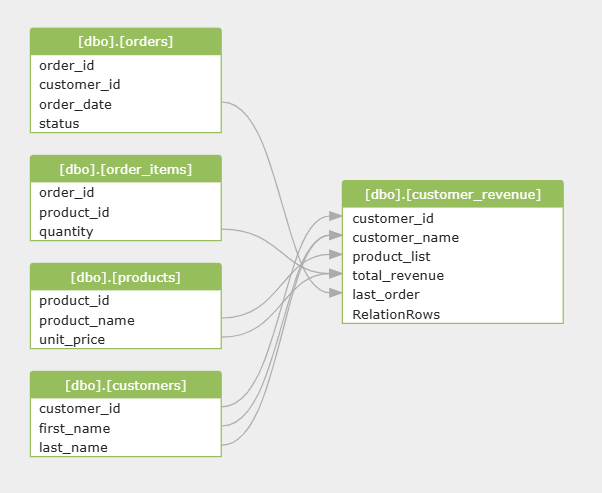
This T-SQL query creates dbo.customer_revenue. GSP traces all five target
columns through bracketed identifiers, four joined tables and nested expressions.
For example, total_revenue depends on both item quantity and product unit price,
while last_order traces through FORMAT(MAX(...)) to the order date.
SQL Server input · SELECT INTO
SELECT
    c.[customer_id],
    CONCAT(c.[first_name], ' ', c.[last_name]) AS [customer_name],
    STRING_AGG(p.[product_name], ', ') AS [product_list],
    SUM(oi.[quantity] * p.[unit_price]) AS [total_revenue],
    FORMAT(MAX(o.[order_date]), 'yyyy-MM-dd') AS [last_order]
INTO [dbo].[customer_revenue]
FROM [dbo].[orders] o
JOIN [dbo].[order_items] oi ON oi.[order_id] = o.[order_id]
JOIN [dbo].[products] p ON p.[product_id] = oi.[product_id]
JOIN [dbo].[customers] c ON c.[customer_id] = o.[customer_id]
WHERE o.[status] = 'PAID'
GROUP BY c.[customer_id], c.[first_name], c.[last_name];
Value sources → dbo.customer_revenue
customer_id
fromcustomers.customer_id
customer_name
fromcustomers.first_namecustomers.last_name
product_list
fromproducts.product_name
total_revenue
fromorder_items.quantityproducts.unit_price
last_order
fromorders.order_date
A readable summary of the generated column relationships. The files preserve object IDs and SQL coordinates.
Both worked examples were compiled and run with public NuGet 4.1.0.18.
The output files are actual SDK output, not illustrative JSON or hand-written XML.
Visualize .NET lineage XML and JSON
Turn the .NET tool’s output into an interactive lineage diagram. Copy the complete XML or
SQLFlow JSON, paste it into Gudu SQL Omni for VS Code or
SQLFlow online, and explore the source-to-target column connections.
Screenshot of the SQL Server example in Gudu SQL Omni. Open either viewer to zoom, pan
and inspect the column connections. The analyzer’s synthetic RelationRows field is also visible.
Open full-size image →
Use the same C# API with EDbVendor.dbvoracle. In this Oracle view,
customer_totals.customer_id comes from orders.customer_id;
total_revenue comes from order_items.quantity and
order_items.unit_price through SUM.
Working with packages or stored procedures?
The current .NET implementation extends analysis into Oracle PL/SQL packages,
procedures, functions, triggers, cursors and resolvable dynamic SQL. Request a current
evaluation build and validate your own scripts: recent advanced Oracle changes are
not all included in the public package used for these examples.
CREATE VIEW customer_totals AS
SELECT
    o.customer_id,
    SUM(i.quantity * i.unit_price) AS total_revenue
FROM orders o
JOIN order_items i ON i.order_id = o.order_id
WHERE o.status = 'PAID'
GROUP BY o.customer_id;
Download the example project and unzip it. With the .NET 10 SDK installed, run these commands from the extracted directory:
dotnet run
dotnet run -- oracle
The first command writes sqlserver.xml and sqlserver.json.
The second writes oracle.xml and oracle.json.
The project pins gudusoft.gsqlparser 4.1.0.18 for reproducibility.
Construct DataFlowAnalyzer with SQL text and a dialect, call
generateDataFlow(), inspect diagnostics, then dispose of the analyzer.
The true constructor argument selects simplified lineage, connecting
final targets to their value sources. Use full mode when you need intermediate result sets.
getDataFlow() exposes the model. getOption() exposes analysis
and output options. These API names are Java-compatible; your application still runs entirely on .NET.
Program.cs · XML and SQLFlow JSON
using gudusoft.gsqlparser;
using gudusoft.gsqlparser.dlineage;
using gudusoft.gsqlparser.util.json;

// Run from this directory: dotnet run, or dotnet run -- oracle
bool oracle = args.Length > 0 && args[0] == "oracle";
string name = oracle ? "oracle" : "sqlserver";
string sql = File.ReadAllText(name + ".sql");
var vendor = oracle ? EDbVendor.dbvoracle : EDbVendor.dbvmssql;

var analyzer = new DataFlowAnalyzer(sql, vendor, true);
try
{
    string xml = analyzer.generateDataFlow();
    foreach (var error in analyzer.getErrorMessages())
        Console.Error.WriteLine(error.getErrorMessage());

    if (analyzer.getErrorMessages().Count > 0)
        return 1;

    File.WriteAllText(name + ".xml", xml);
    var model = DataFlowAnalyzer.getSqlflowJSONModel(analyzer.getDataFlow(), vendor);
    File.WriteAllText(name + ".json", JSON.toJSONString(model));
    Console.WriteLine("Saved " + name + ".xml and " + name + ".json");
    return 0;
}
finally
{
    analyzer.dispose();
}
Export lineage for your application
Build impact analysis by following source-to-target edges, explain an ETL mapping, or feed a data catalog. Choose an output format for the integration you are building.
XML
The <dlineage> model includes objects, columns and <relationship> edges. generateDataFlow() returns this format directly.
JSON
Convert the model to SQLFlow JSON, as the C# example does. Database objects, processes and relationships are machine-readable inputs for your own tooling.
CSV
The dlineage demo supports detailed or simplified column mappings and table-level CSV for review and downstream processing.
Graph data
Use the demo’s /json /graph or /lv output when integrating a visualization into your own application. To explore the standard XML or SQLFlow JSON directly, use Gudu SQL Omni or SQLFlow online.
Generate JSON with the dlineage command-line demo
Clone gsp_demo_dotnet, save a SQL Server query as query.sql, and run the commands below from the repository root.
For Oracle, use /t oracle. Use /csv or /tableLineage for other projections.
See the full dlineage user guide for offline metadata, directory input and output options.
The explicit package version enables the formal lineage API; the demo repository’s older default package pin does not.
Give lineage the schema context it needs
Explicitly qualified columns, such as those in the examples, can be analyzed from SQL text.
For SELECT *, ambiguous column names or references to objects defined elsewhere,
supply offline table, column and view metadata through setSqlEnv() or the demo’s
/env option. No live database connection is needed for analysis.
Review diagnostics before trusting a lineage result. Static analysis cannot recover arbitrary SQL assembled from runtime-only values.
Choose the SQL Server or Oracle dialect, include relevant object definitions, and evaluate representative procedures against the exact build you intend to use.
Parser dialect coverage and advanced lineage coverage are separate questions.
Reference gudusoft.gsqlparser, choose the database dialect, create a DataFlowAnalyzer and call generateDataFlow(). Read the resulting source-to-target relationships as XML or use the model API. The downloadable C# project on this page also exports SQLFlow JSON. No database connection or JVM is required.
Does the .NET SDK support SQL Server data lineage?
Yes. The example on this page traces five SELECT INTO target columns through SQL Server joins, CONCAT, STRING_AGG, SUM, MAX and FORMAT. It was compiled and run with public NuGet 4.1.0.18. For larger batches, stored procedures and dynamic SQL, evaluate representative scripts with the build you plan to deploy.
Does the C# SDK support Oracle SQL and PL/SQL lineage?
Yes. The downloadable Oracle CREATE VIEW example traces customer_id and aggregated revenue to their source columns on public NuGet 4.1.0.18. For advanced PL/SQL packages, procedures, functions, triggers, cursors and dynamic SQL, request a current evaluation build. Recent advanced Oracle changes are not all included in that public package; validate your scripts with the supplied build.
What is the difference between a SQL parser and a lineage engine?
A parser produces a syntax tree and can enumerate tables and columns. A lineage engine resolves references and follows how source values contribute to target columns through expressions, queries and statements. GSP provides both in .NET. This makes it suitable for impact analysis, ETL mappings and data catalog integrations.
Can I export lineage as XML, JSON or CSV?
Yes. generateDataFlow() returns XML. The model can be converted to SQLFlow JSON, as shown in the downloadable C# project. The dlineage demo also offers detailed and simplified CSV, table-level lineage and graph JSON. Paste the XML or SQLFlow JSON into Gudu SQL Omni in VS Code or the online SQLFlow tool to explore an interactive diagram.
How can I visualize the .NET lineage XML or JSON?
Use Gudu SQL Omni for VS Code or SQLFlow online. In VS Code, paste the complete XML or SQLFlow JSON into an editor and run GSP: Data Lineage (Ctrl+Alt+L, or Cmd+Alt+L on macOS). Online, sign in if prompted, paste the same output into the SQLFlow editor and click Visualize Lineage. Both viewers let you zoom, pan and explore column connections. Use the dlineage XML or SQLFlow JSON generated by the .NET tool, including the sample files on this page.
Can lineage analysis run offline without SQL Server or Oracle?
Yes. GSP analyzes SQL text in your .NET process without executing it or connecting to the database. Supply offline schema metadata when wildcard expansion or ambiguous unqualified columns require catalog context. Dynamic SQL can be analyzed when its statement text can be resolved; SQL text alone cannot reveal arbitrary runtime-generated statements.
Do I need Java to use the .NET lineage API?
No. DataFlowAnalyzer, Option, generateDataFlow() and the model methods use Java-compatible API names, but the implementation runs as C# on .NET. The example targets .NET 10. The package also supplies a netstandard2.0 assembly for compatible hosts, including .NET Framework 4.6.2 and later.
Can I evaluate lineage before buying a licence?
Yes. Start with the public NuGet trial and the examples on this page. The public trial rejects SQL longer than 10,000 characters. Request an evaluation build for longer scripts, advanced procedure analysis and confirmation of your dialect, runtime and redistribution requirements.
Evaluate your SQL Server or Oracle workload
Start with the runnable examples, then send a representative query or stored procedure. Tell us you need .NET data lineage, your target runtime and the output you expect. We can recommend an evaluation build and review the SQL with you.
The public NuGet trial has a 10,000-character SQL limit. Request an evaluation build for larger scripts and the latest advanced lineage support.